
Holler Setup & Help
Everything beyond the 3 steps in your welcome email. Tap a topic to open it. Your Holler number is in your welcome email from always@mail.holler.xyz.
Change how many times my phone rings
AT&T or T-Mobile: the 15 at the end of your code is how many seconds your phone rings before Holler answers. To change it, dial your code again with a different number at the end:
5 | about 1 ring |
10 | about 2 rings |
15 | about 3–4 rings (recommended) |
20 | about 4–5 rings |
25 | about 5–6 rings |
30 | about 6–7 rings |
Most callers decide no one is going to pick up after 3 rings, 4 at most. That's why we recommend 15.
Verizon: Verizon sets the ring time, and it can't be changed with a code.
Examples (if your Holler number were 805-555-0100; only the last number changes):
| About 2 rings | **61*18055550100**10# |
| About 3–4 rings | **61*18055550100**15# |
| About 5–6 rings | **61*18055550100**25# |
Let Holler answer when I press Decline
Normally, Holler answers the calls you let ring. If you'd also like Holler to answer when you press Decline, or when you're already on another call:
AT&T or T-Mobile:
1. Open the Phone app and tap the keypad.
2. Type *67*, then your Holler number, then #.
3. Press Call.
It looks like this (with your own Holler number from your welcome email): *67*8055550100#
Verizon: nothing to do. This already works.
Set up Google Voice
1. On a computer, go to voice.google.com.
2. Click the gear (Settings), then Calls.
3. Turn on Call forwarding to your cell phone.
4. Turn Screen calls off.
5. On your cell phone, dial the activation code from your welcome email.
Done. When someone calls your Google Voice number, your cell rings. If you don't answer, Holler does.
Good to know: calls from Google Voice show your Google Voice number on your cell (sometimes with a "Spam Risk" label), not the caller's. That's normal. Holler asks those callers for their number, so your job text always has the right one.
I use a different phone company
Spectrum, RingCentral, a landline, or something else? Email us at always@holler.xyz with your phone company, and we'll set it up with you.
Is Holler turned on?
The easiest way to check: call your business number from another phone and don't answer. If Holler picks up after a few rings, you're all set.
AT&T or T-Mobile can also type *#61# and press Call. Your phone shows a screen saying forwarding is on.
Turn Holler off
Your missed calls go back to your voicemail.
AT&T or T-Mobile: type ##002# and press Call.
Verizon: type *73 and press Call.
To turn Holler back on, dial your activation code again.
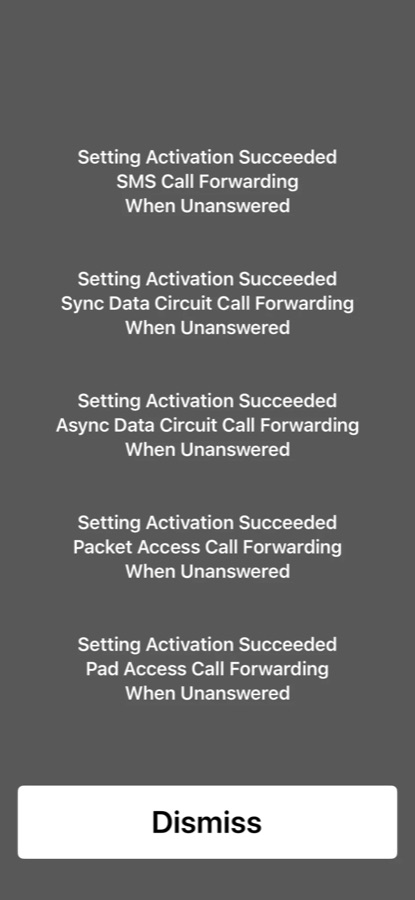
The gray screen after dialing
After you press Call, your phone may show a gray screen with several lines saying "Setting Activation Succeeded." As long as it says that, everything is good. Just close the screen (swipe up).
I got "Unknown Error" or nothing happened
Check the code is exactly as shown in your welcome email, including the 1 before your Holler number on AT&T and T-Mobile. Then try again.
Still not working? Email us at always@holler.xyz and tell us your phone company. We'll get you set up.
iPhone: calls aren't reaching Holler
Turn off Live Voicemail: Settings → Apps → Phone → Live Voicemail → Off. When it's on, your iPhone answers missed calls itself and they never reach Holler.
When friends or family call
Holler isn't only for customers. If a friend or family member calls and says something like "Tell Mike I called" or "Can I talk to Mike?", Holler skips the job questions, takes a quick message, and texts it to you.
They don't have to wait for Holler to finish talking. As soon as they ask for you, Holler stops and takes their message.
Get job alerts at night or on silent
If you take emergency calls after hours, save (805) 456-0067 as a contact (e.g. "Holler Job Alerts"), then:
iPhone: Contacts → Holler Job Alerts → Edit → Text Tone → turn on Emergency Bypass → Done.
Android: open your texts from Holler Job Alerts → ⋮ → Details → Notifications → turn on the option to override Do Not Disturb (the name varies by phone).
Rather not be woken up? Skip this. The text will be waiting for you in the morning.
Still have a question? Email us at always@holler.xyz or use our support form. We'll personally help.